Your analytics page now shows who is on your profile right now.
A new Live card sits under the performance snapshot, listing visitors as they arrive. Each one is anonymized and numbered, with the country and city they came from and what they did: viewed your profile, clicked a block by name, scanned your QR code, or followed one of your short links. A globe turns alongside the feed, plotting where those visitors are in the world.
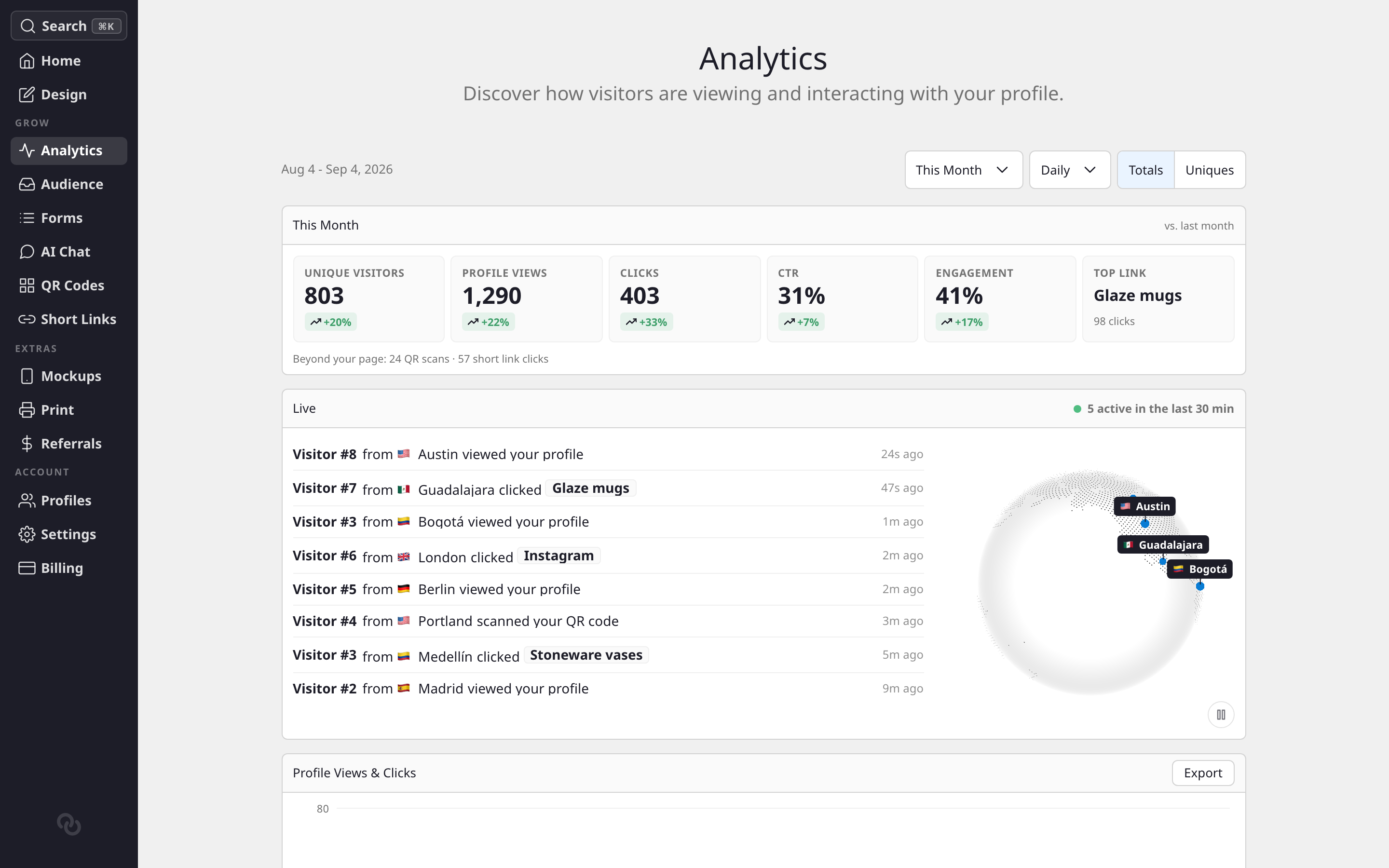
- It appears when there is something to see. With no recent activity the card hides itself rather than showing you an empty box.
- It refreshes on its own, faster while people are arriving and slower when things are quiet.
- Nobody is identified. Visitors are numbered in the order they show up, and the numbering resets with the window.
Two other things landed on the same page:
- Engagement is a new snapshot tile: the share of your visitors who clicked something, not just how many showed up.
- Beyond your page is a line under the tiles counting your QR scans and short link clicks, so activity that never touches your profile still gets counted.
The charts got a redesign too, with readable date labels, a lighter grid, and a color-keyed totals strip that doubles as the legend.
See How do I see how my page is performing? for a full tour of the analytics page.