Sometimes one link matters more than your whole profile: a launch day, a ticket sale, a pre-save, a fundraiser closing tonight. Skip To Link turns your profile into a redirect for as long as you want. Visitors who open your Liinks URL never see your page, they land on the link you picked.
When you switch it off, your profile comes back exactly as you left it. Nothing is deleted, no blocks are moved.
Turn it on
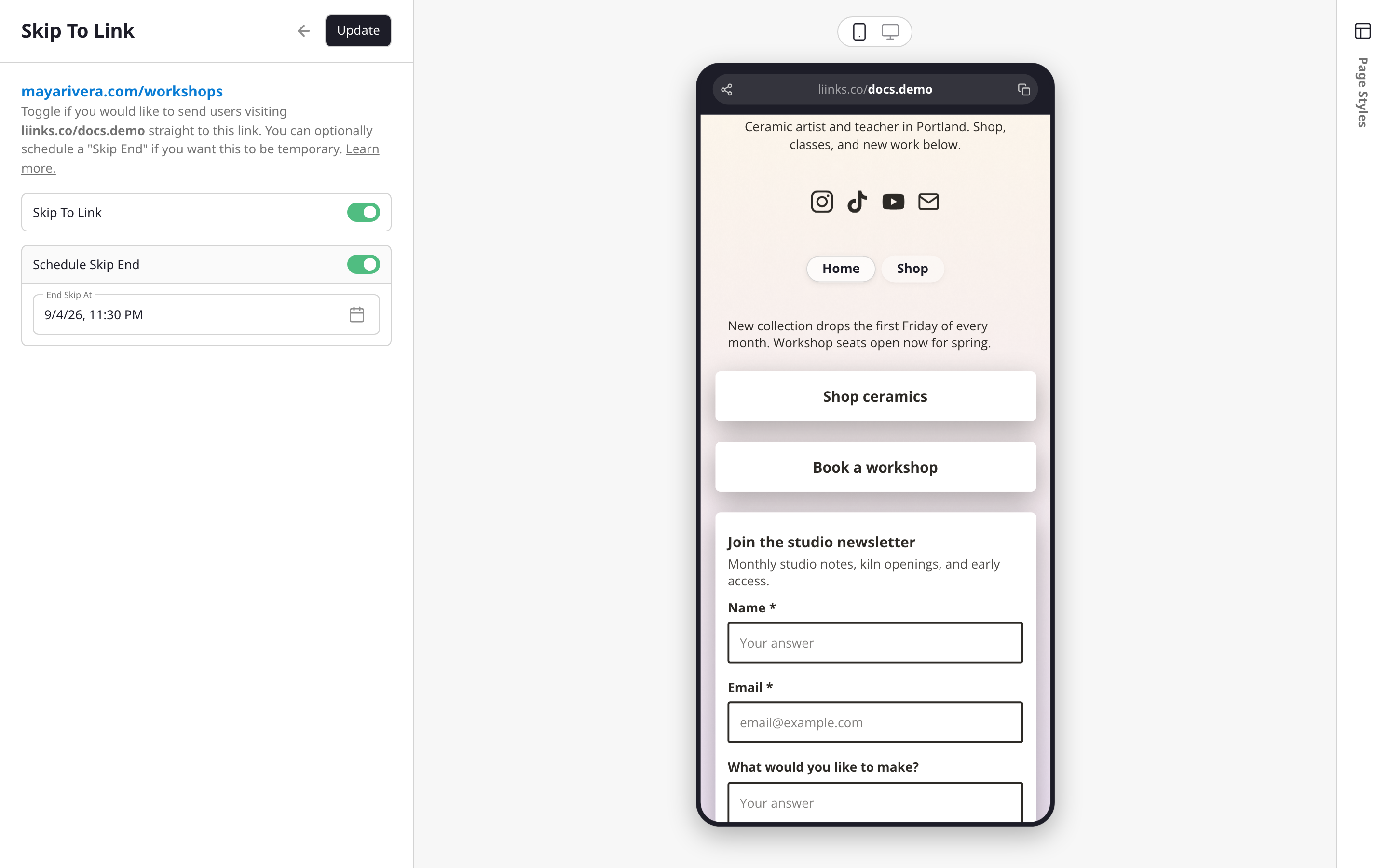
- Open your page in the editor.
- Click the block you want to send visitors to. It has to be a button or link block pointing at a web address.
- In the block's editor, open the Skip To Link add-on.
- Turn on Skip To Link and click Update.
That's it. Your profile URL now redirects to that block's destination, and so does a connected custom domain.
Schedule an end
Most skips are meant to be temporary, and it is easy to forget you turned one on. In the same panel, turn on Schedule Skip End and pick a date and time under End Skip At. The time has to be in the future.
When that moment arrives, Liinks turns the skip off for you and your profile starts loading normally again. You don't need to be around, and you don't need to touch anything.
Turn it off early
While a skip is active, the editor shows a warning at the top of the sidebar: "You are skipping your profile." Click Click here to stop and your page is live again immediately.
You can also reopen the block's Skip To Link add-on and switch the toggle off.
Good to know
- Only one block can skip at a time. Turning it on for a second block automatically turns it off for the first one, across every page of your profile.
- It works on links to web addresses. Blocks that open an email address, a file, an image, or another page of your profile can't be used for skipping. If you edit a skipping block and change its destination to something that isn't a web address, the skip switches itself off.
- Clicks are still tracked. A visitor who gets redirected counts as a click on that block, so you can see the traffic in your analytics. There is no profile view for those visits, because your page never loads.
- Your other links keep working. Short links, QR codes pointing at other destinations, and standalone form links are unaffected.
- Search engines see the redirect too. If a skip is on for a long stretch, crawlers will follow it instead of indexing your profile, so switch it back when the moment has passed.
Other block add-ons
Skip To Link sits alongside the other per-block add-ons:
- Schedule to show or hide a block on a date
- Click Goal to track progress toward a click target
- Gating to require an email, a password, or a form before a link opens